Download for Mac
macOS says “RTILA X is damaged and can’t be opened”? Your download is fine. It is a macOS security notice and it takes about 30 seconds to clear.
Show me the fix ↓- Apple Silicon (M1/M2/M3/M4): Native build
- Intel Mac: Supported build
- RAM: 4GB minimum recommended
- Storage: 2GB free space
Apple Silicon (M1 / M2 / M3 / M4)
Download for Apple SiliconIntel Mac
Download for Intel MacNot sure which chip your Mac has? Click the Apple menu, select About This Mac, and look at the chip or processor line. Apple Silicon shows M1, M2, M3 or M4. Intel shows an Intel Core processor.
After downloading, run the installer. RTILA X launches automatically.
Trusted since April 2020 · 119 verified reviews · 4.8/5 average rating
“RTILA X is damaged and can’t be opened”
Nothing is wrong with your download and your Mac is not broken. This is macOS Gatekeeper doing its job, and clearing it takes one line in Terminal.
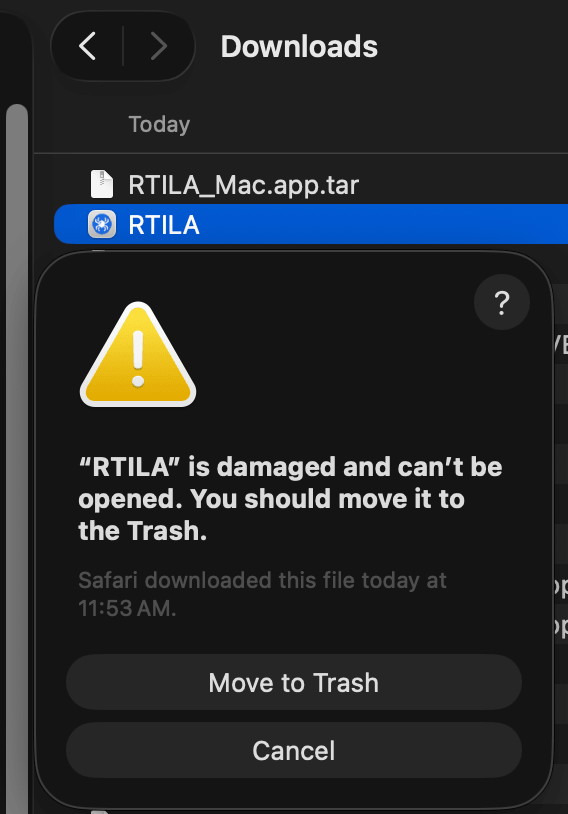
-
Open Terminal
Press ⌘ Command and Space at the same time. Type Terminal. Press Return. A window with a text prompt appears — that is Terminal.
-
Copy the command that matches where RTILA is
Only one of these will work, depending on where the app ended up. When in doubt, use the first one — and drag RTILA into your Applications folder beforehand.
Most people want this oneRTILA is in your Applications folder
You dragged RTILA into Applications, or you can see it under Finder → Applications. If you have not moved it there yet, do that first: drag RTILA.app out of Downloads and drop it onto Applications. That is where macOS expects apps to live.
xattr -cr /Applications/RTILA.appStill in DownloadsRTILA is still in your Downloads folder
You double-clicked the file straight from Downloads and never moved it anywhere else.
xattr -cr ~/Downloads/RTILA.appNot sure where RTILA is? Use this instead — it always works
-
In Terminal, type
xattr -crand then press the space bar once. Do not press Return yet. - Open a Finder window and find the RTILA icon.
-
Drag the RTILA icon from Finder straight into the Terminal
window and let go. Terminal fills in the exact path for you —
it looks something like
/Users/you/Desktop/RTILA.app. - Now press Return.
-
In Terminal, type
-
Paste it and press Return
Click inside the Terminal window, press ⌘ Command + V, then press Return.
Terminal shows nothing when it works. No message, no confirmation, just a fresh prompt on the next line. That silence means success. Close Terminal and open RTILA X normally.
Still won’t open?
-
If you still see
RTILA_Mac.app.tar.gz, that is the compressed archive, not the app. Double-click it once — macOS unpacks it intoRTILA.app— then run the fix again. -
If Terminal says
No such file or directory, the path is wrong. Use the drag-into-Terminal method above. -
If Terminal says
Operation not permitted, putsudoin front of the command and press Return. It asks for your Mac login password. Nothing appears on screen as you type — that is normal. Press Return again.
Still stuck? Email support@rtila.com with your macOS version and where RTILA.app is sitting. We will walk you through it.
Why does macOS do this?
macOS attaches a hidden com.apple.quarantine
flag to every file that arrives from the internet. When you open a
quarantined app, Gatekeeper checks its code signature. If that check
does not satisfy Gatekeeper, macOS reports the app as “damaged” —
even though the file is byte-for-byte intact.
xattr -cr removes
that flag. -c clears
the attributes, -r
does it recursively so every file inside the app bundle is covered.
Nothing inside RTILA X is modified.
You may see advice elsewhere to right-click the app and choose Open. That clears a different warning — “cannot be opened because the developer cannot be verified” — and usually does not clear a “damaged” error. Use the Terminal command.